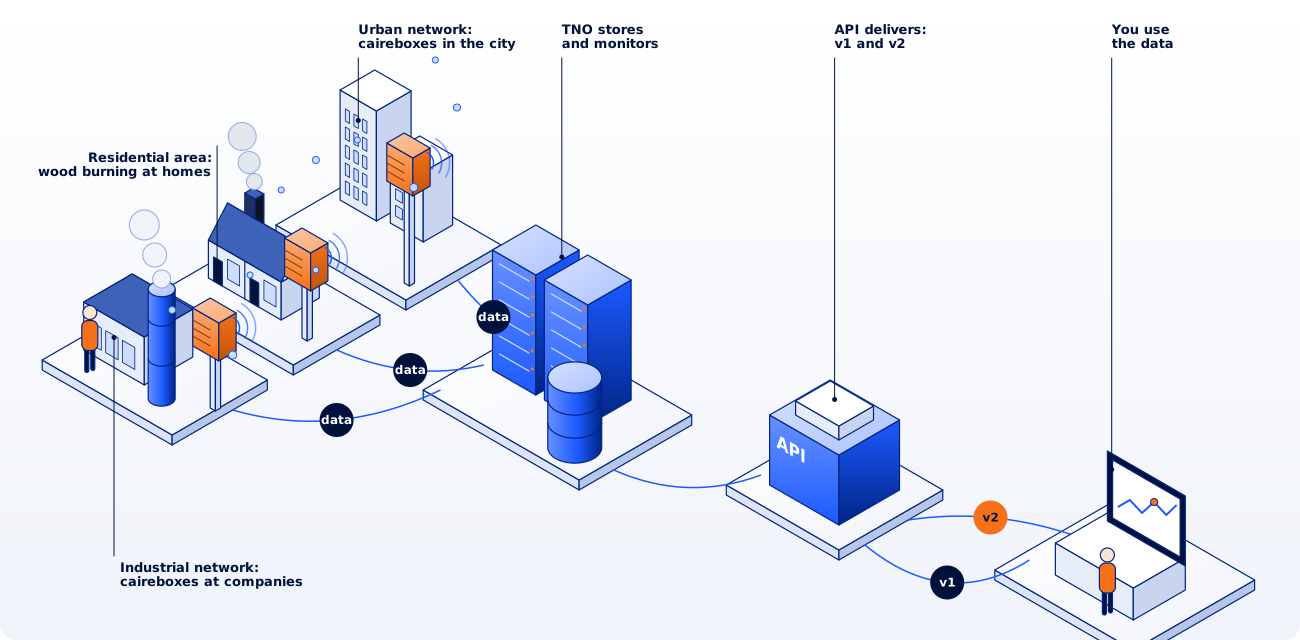
v2 Recommended
OGC SensorThings API
https://api.dustmonitoring.nl/v2 offers the same data according to the open standard
OGC SensorThings API 1.1 (Sensing, read-only).
Existing SensorThings clients and libraries work with it directly.
- Thing
- A measurement location, with the project in properties.
- Location, FeatureOfInterest
- The geographical position of the measurement location.
- Datastream
- The series of one quantity at one location, e.g. PM10 at I02.
- ObservedProperty, Sensor
- The measured quantity (PM1, PM2.5, PM10, NO2, ...).
- Observation
- One measured value (result) with timestamp (phenomenonTime, UTC).
Supported: $filter (including string, date, arithmetic and geospatial functions), $orderby, $top, $skip, $count, $select, $expand (also nested), $ref and $value.
Each request returns 100 records by default (at most 10000); @iot.nextLink gives the next set.
Without $orderby, Observations are returned newest first.
Preferably filter Observations on phenomenonTime: a request over the entire history may take too long and then returns HTTP 503.
A $count that takes too long is omitted.
All endpoints, parameters and responses are in the interactive reference, where you can also try them out directly.
v1
OData
The v1 API is based on the OData standard. Access via https://api.dustmonitoring.nl/v1. A project is a set of measurement locations; a location is the fixed position of a cairebox. For new integrations we recommend v2.
- /projects
- All projects available through the API.
- /locations
- The measurement locations of a selected project.
- /observations
- The current measured values of a selected project.
- /stream
- The measured values of one location in a project, in a simplified format.
Projects
The request /projects returns for each project:
- ID: project identifier;
- Name: project name;
- Description: short description of the project.
The list can be filtered by project ID, e.g. /projects?$filter=id eq 30.
Locations
The request /project(..)/locations returns for each location:
- ID: location identifier;
- Name: location name;
- Description: short description of the location;
- Observables: list of measured quantities, e.g. PM1, PM2.5, PM10.
The list can be filtered by location ID, e.g. /project(30)/locations?$filter=id eq 521.
Observations
The request /project(..)/observations?$expand=data returns the current data of all locations in the selected project:
- grouped by location: location ID;
- grouped by time: timestamp (UTC) of the measurement;
- Name: name of the measured quantity;
- Value: measured value;
- Unit: unit of the measured value.
The list can be filtered by location ID, e.g. /project(30)/observations?$expand=data&$filter=location eq 521.
You can also select the items to return, e.g. /project(30)/observations?$filter=location eq 521&$expand=data($select=timestamp,entities/name,entities/value).
Stream
The request /project(..)/location(..)/stream returns the measured values of a location:
- Timestamp: timestamp (UTC) of the measurement;
- Entity: ID of the measured quantity;
- Name: name of the measured quantity;
- Value: measured value;
- Unit: unit of the measured value.
The values can be filtered by quantity ID, e.g. only PM1: /project(30)/location(521)/stream?$filter=entity eq 128, or by name: ?$filter=name eq 'PM1'.
You can also filter by time, e.g. /project(30)/location(521)/stream?$filter=timestamp gt 2026-10-01T00:00:00Z and entity eq 128.
And you can select the items to return, e.g. /project(30)/location(521)/stream?$filter=timestamp gt 2026-10-01T00:00:00Z and entity eq 128&$select=timestamp,entity,value.
Each request returns at most 144 records, oldest first by default; an @odata.nextLink in the output gives the next set. Use $orderby=timestamp desc to get the newest first.
For a description of the filter options, see the OData specification.